


Did you know that most homebuyers in East Texas spend more time picking out paint colors than they do calculating their actual monthly mortgage payment? It’s true! We all love scrolling through Zillow and imagining where the couch will go, but then the "payment shock" hits when the first bill arrives.
If you’re looking for a home in Longview, Gilmer, or Jefferson, you’ve probably realized that a $300,000 house doesn't always cost the same per month as another $300,000 house just down the road. Why? Because the "hidden" costs like property taxes and insurance can vary wildly depending on where you're standing.
That’s where a mortgage calculator for Longview, TX becomes your best friend. But here’s the catch: a generic calculator you find on a big national site might give you a number that's hundreds of dollars off because it doesn't know our local Texas market.
In this guide, we’re going to look at how to use a mortgage calculator like a pro so you can walk into your next home tour with total confidence. My team and I at Greenlight Mortgage want to make sure you never have to guess about your budget.
Why a Generic Calculator Isn't Enough for East Texas
Let’s talk about why those "one-size-fits-all" calculators can be a bit dangerous. Most national calculators use national averages for things like property taxes and homeowners insurance.
In Texas, we don't have a state income tax (which is awesome!), but that means our property taxes are often higher than in other states to help pay for our schools and roads. If a calculator defaults to a 0.5% tax rate and you’re actually paying 1.2% in Gregg County, your monthly payment estimate could be off by a lot.
When you’re planning your future, "close enough" isn't really good enough. You want to know exactly what’s coming out of your bank account every month.

Understanding "PITI": The Four Pillars of Your Payment
Before we dive into the numbers, it’s helpful to understand what actually makes up a mortgage payment. We call it PITI (pronounced like "pity," though we hope you never feel that way about your mortgage!).
- Principal: This is the actual amount of money you borrowed to buy the home. Every month, a portion of your payment goes toward paying down this balance.
- Interest: This is what the lender charges you for the loan. In the early years of your mortgage, a bigger chunk of your payment goes to interest.
- Taxes: This refers to your local property taxes. In Longview, these are collected by the county and the school district.
- Insurance: This includes your homeowners insurance (to protect your home from things like East Texas thunderstorms or fire) and, if you put down less than 20%, Private Mortgage Insurance (PMI).
Now let’s look at how these specific factors play out right here in our backyard.
The Longview Specifics: Taxes and Insurance
If you’re using a mortgage calculator for the Longview area, you need to plug in real local data.
Property Taxes in Gregg County
Property taxes can be a bit confusing because they are a combination of several different "taxing units." This includes the City of Longview, Gregg County, and your specific school district (like Longview ISD or Pine Tree ISD).
On average, the effective property tax rate in Longview and the surrounding Gregg County areas often lands between 0.8% and 1.2% of the home's value.
- Pro Tip: If you want to be super precise, you can check the exact tax rate for a specific property through the Gregg County Tax Office portal.
Homeowners Insurance in East Texas
East Texas is a beautiful place to live, but we do get our fair share of wild weather. Between heavy rainfall, occasional hail, and the risk of wind damage, insurance companies consider us a "moderate" risk area.
For a typical home in the $300,000 range, you should budget anywhere from $2,500 to $4,000 per year for homeowners insurance. That breaks down to about $210 to $330 per month.
If you aren't sure where to start, the Texas Department of Insurance has some great resources for comparing rates, or you can always ask us for a recommendation for a local agent who knows the Longview market.
Step-by-Step: How to Use the Calculator Like a Pro
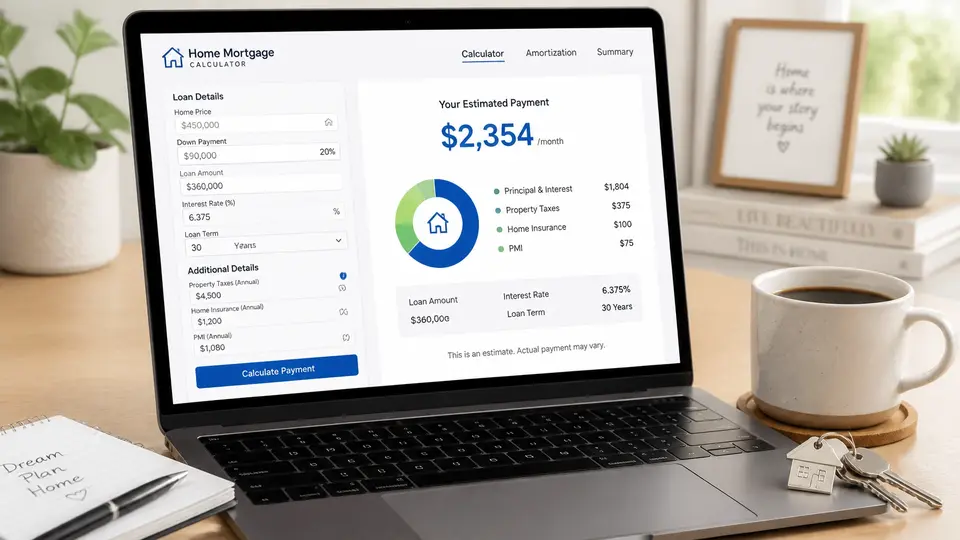
Ready to crunch some numbers? Here is how to fill out a mortgage calculator correctly for an East Texas home.
Step 1: The Home Price
This is the fun part! Put in the price of the home you’re eyeing. If you’re just starting out, try a few different price points to see how it changes your monthly "comfort zone."
Step 2: The Down Payment
Are you planning to put down 3.5% (common for FHA loans), 5%, 10%, or the traditional 20%? The more you put down, the lower your monthly principal and interest will be.
Step 3: The Interest Rate
Interest rates change every day. While a calculator might default to a certain number, it’s always best to get a pre-approval to see what rate you actually qualify for based on your credit score and financial history.
Step 4: The Loan Term
Most people go for a 30-year fixed-rate mortgage because it keeps the monthly payments lower. However, if you want to pay off your home faster and save a ton of money on interest, look at the 15-year option.
Step 5: Taxes and Insurance (The Local Secret)
Don't skip the "Advanced" or "Options" section! This is where you enter the local Longview data we talked about earlier.
- Property Tax: Set this to roughly 1.0% to 1.2% of the home value.
- Home Insurance: Enter the annual amount (use $3,000 as a safe middle ground for an average-priced home).
What the Calculator Won't Tell You
Calculators are great, but they are just tools. They don't know the full story. For example, a calculator won't tell you about:
- HOA Fees: If you’re looking at a neighborhood with a Homeowners Association, that’s an extra monthly or annual fee that isn't part of your mortgage payment but is definitely part of your budget.
- Maintenance: A good rule of thumb is to set aside 1% of your home's value every year for repairs. If you buy a $300,000 house, try to save $3,000 a year for that inevitable day when the AC decides to take a nap in July.
- Closing Costs: You’ll need cash at the closing table for things like title insurance, appraisal fees, and government recording fees.

Let’s Make It Personal
Working with a mortgage calculator is a fantastic first step, but it shouldn't be your last. At Greenlight Mortgage, we believe every client deserves a personalized plan.
My team and I specialize in helping families in Longview and beyond navigate the complexities of home buying. Whether you’re a first-time homebuyer who needs some extra education or you've been turned down by a big bank and need a team that will fight for your dream, we’re here for you.
We take the time to look at your specific situation: your debt, your income, and your goals: to find a mortgage product that fits like a glove. Plus, once you close on your home, we even offer a free moving truck to our clients to help make the process even smoother!

Your Next Steps
Planning your monthly payment doesn't have to be stressful. By using a mortgage calculator with local Longview, TX data, you’re already ahead of the curve.
Here’s what I recommend you do next:
- Play with the numbers: Use a calculator to find your "sweet spot" payment.
- Get local data: Check the specific tax rates for the neighborhoods you love.
- Reach out to us: If you’re ready to get a real, "to-the-penny" estimate, contact our team today. We’ll ease your confusion and help you move into your new home with total peace of mind.
Buying a home is one of the biggest decisions you’ll ever make, and you don’t have to do it alone. Let’s get you that "green light" on your home loan!
Have questions about your own situation? Call Kenneth Travis's team at 903-331-0892 or start your pre-approval.
This is not a commitment to lend. All loans subject to credit approval. Guidelines subject to change without prior notice. Rates, programs and figures mentioned in this article reflect the date it was published.